Jeecoo J50 - Headset Handleiding
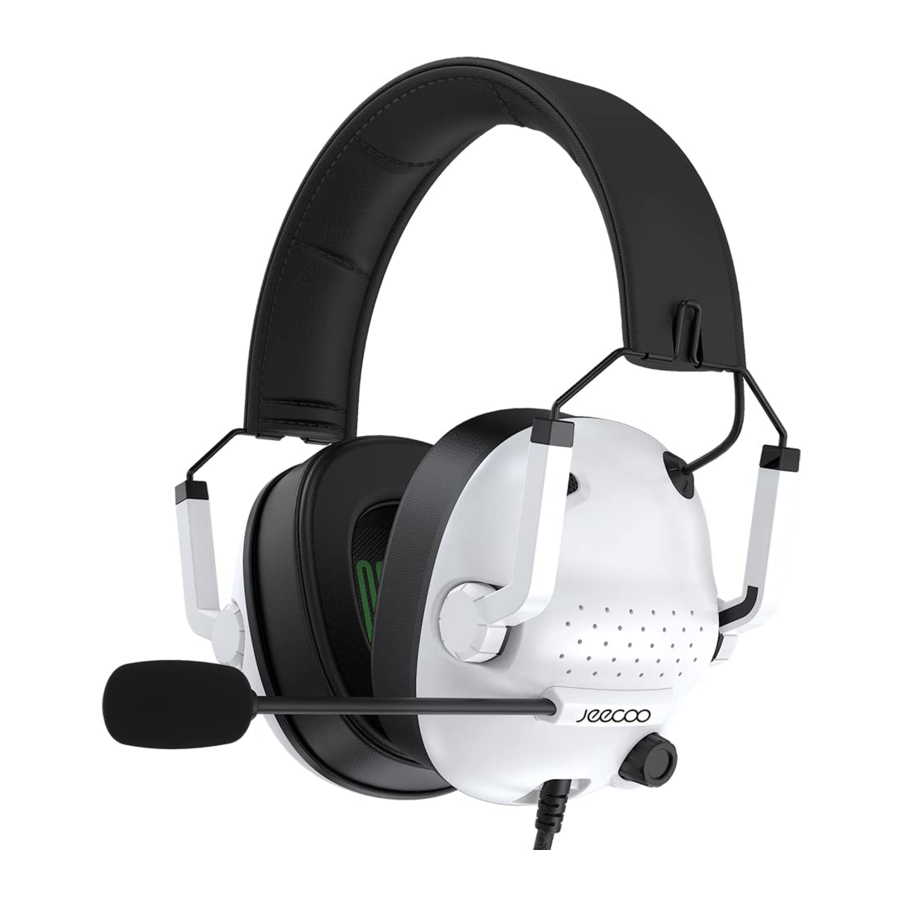
Productintroductie

- headband (hoofdband)
- Telescopic arm (Telescopische arm)
- ear pads (oorkussens)
- microphone (microfoon)
- braided wire (gevlochten draad)
- 3.5mm interface
PC-aansluitschema

Connect the extension cable and plug into audio output jack and microphone input jack (Sluit de verlengkabel aan en steek deze in de audio-uitgang en de microfooningang)
Xbox One-aansluitschema

For the latest Xbox One, direct access to audio output jack For Older XBox One, requires Microsoft adaptor (Voor de nieuwste Xbox One, directe toegang tot audio-uitgang. Voor oudere Xbox One is een Microsoft-adapter vereist)
PS4-aansluitschema

Plug directly into the PS4 audio output jack (Sluit rechtstreeks aan op de audio-uitgang van de PS4)
Aansluitschema mobiele telefoon

Plug directly into the phone audio output jack (Sluit rechtstreeks aan op de audio-uitgang van de telefoon)
iPad-aansluitschema

Plug directly into the iPad audio output jack (Sluit rechtstreeks aan op de audio-uitgang van de iPad)
Het toepassingsgebied en de instructies voor gebruik
- This headset is not only suitable for computers, but also for most 3,5mm audio devices such as Walkman, mobile phones, tablets, etc. (Deze headset is niet alleen geschikt voor computers, maar ook voor de meeste 3,5 mm audio-apparaten zoals Walkman, mobiele telefoons, tablets, enz.)
- The side of the headset cord and the microphone is the left side. (De kant van het headset snoer en de microfoon is de linkerkant.)
![]() When wearing this headset, the side of the cord should be on your left ear. (Bij het dragen van deze headset moet de kant van het snoer aan uw linkeroor zitten.)
When wearing this headset, the side of the cord should be on your left ear. (Bij het dragen van deze headset moet de kant van het snoer aan uw linkeroor zitten.) - When using the audio Y Splitter Cable, (Bij gebruik van de audio Y Splitter-kabel,)
![]() mark corresponds to the green jack of your computer for headset audio, (komt het merkteken overeen met de groene aansluiting van uw computer voor headset audio,)
mark corresponds to the green jack of your computer for headset audio, (komt het merkteken overeen met de groene aansluiting van uw computer voor headset audio,) ![]() mark corresponds to the red jack of your computer for microphone. (komt het merkteken overeen met de rode aansluiting van uw computer voor microfoon.)
mark corresponds to the red jack of your computer for microphone. (komt het merkteken overeen met de rode aansluiting van uw computer voor microfoon.) - When using the microphone of the headset, please make sure that the built-in microphone feature of your computer is turned on and the (Zorg er bij het gebruik van de microfoon van de headset voor dat de ingebouwde microfoonfunctie van uw computer is ingeschakeld en dat het)
![]() recording level is not less than 50%. (opnameniveau niet lager is dan 50%.) You can open the volume mark (U kunt het volumeteken openen)
recording level is not less than 50%. (opnameniveau niet lager is dan 50%.) You can open the volume mark (U kunt het volumeteken openen) ![]() in the lower right corner of your computer screen to the setting. (in de rechteronderhoek van uw computerscherm naar de instelling.)
in the lower right corner of your computer screen to the setting. (in de rechteronderhoek van uw computerscherm naar de instelling.)
 When wearing this headset, the side of the cord should be on your left ear. (Bij het dragen van deze headset moet de kant van het snoer aan uw linkeroor zitten.)
 mark corresponds to the green jack of your computer for headset audio, (komt het merkteken overeen met de groene aansluiting van uw computer voor headset audio,)
  mark corresponds to the red jack of your computer for microphone. (komt het merkteken overeen met de rode aansluiting van uw computer voor microfoon.)
 recording level is not less than 50%. (opnameniveau niet lager is dan 50%.) You can open the volume mark (U kunt het volumeteken openen)
  in the lower right corner of your computer screen to the setting. (in de rechteronderhoek van uw computerscherm naar de instelling.)
Aandachtspunten
- When listening to music, please adjust the volume at the appropriate range to prevent too loud to hurt your ears. (Pas bij het luisteren naar muziek het volume aan binnen het juiste bereik om te voorkomen dat het te hard is en uw oren beschadigt.)
- Please use the headphones carefully when driving to prevent traffic accidents. (Gebruik de hoofdtelefoon voorzichtig tijdens het autorijden om verkeersongevallen te voorkomen.)

Download handleiding
Hier kunt u de volledige pdf-versie van de handleiding downloaden. Deze kan aanvullende veiligheidsinstructies, garantie-informatie, FCC-regels, enz. bevatten.
Download Jeecoo J50 - Headset Handleiding


