eMeet Luna, Luna Lite Handleiding
- 1 Wat zit er in de doos
- 2 Knoppen
- 3 Knopbediening
- 4 LED-statusindicator
- 5 Gebruiksaanwijzing
- 6 AI-ruisonderdrukking
- 7 Opladen
- 8 Batterij niveau controleren
- 9 Audio-uitgang
- 10 Daisy Chain
- 11 Audio-ingang
- 12 LOCK port Setting (LOCK poort instelling)
- 13 Productparameters
- 14 Klantenservice
- 15 Referenties
- 16 Download handleiding
- 17 In andere talen
Wat zit er in de doos
Luna

Luna Lite

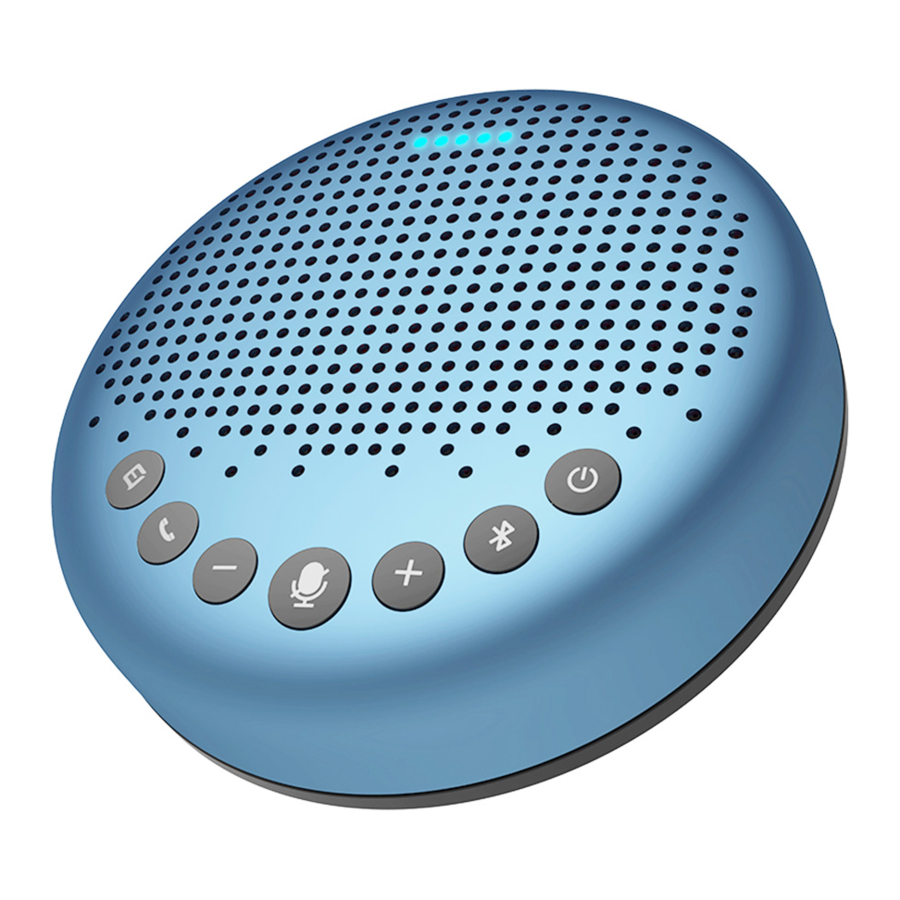
Knoppen

- AI-ruisonderdrukking aan/uit
- Telefoongesprek beantwoorden/beëindigen
- Volume omhoog
- Volume omlaag
- Microfoon dempen/opheffen
- Bluetooth
- Aan/uit
- LED-statusindicator
- USB-poort
- AUX OUT/LINK-poort
- LOCK-poort
- AUX IN-poort
Knopbediening
 | Press (Druk) | Volume up/down (Volume harder/zachter) |
 | Press (Druk) | AI noise reduction on/off (AI-ruisonderdrukking aan/uit) |
 | Incoming call, press (Inkomende oproep, druk) | Answer a call (Een oproep beantwoorden) |
| Incoming call, press and hold for 2 seconds (Inkomende oproep, houd 2 seconden ingedrukt) | Reject a call (Een oproep weigeren) | |
| Call going, short/lone press (Gesprek gaande, kort/eenmalig indrukken) | End a call (Een oproep beëindigen) | |
 | Press (Druk) | Mute/unmute microphone (Microfoon dempen/opheffen) |
 | Press and hold (Ingedrukt houden) | Power on/off (Aan/uit) |
LED-statusindicator
| Status | Indicatie | Licht |
| Mic Mute | Turns red (Wordt rood) |  |
| Incoming call when Bluetooth is connected | Flashes green (Knippert groen) |  |
| Skype for business incoming call when USB is connected | ||
| Volume display | Turns cyan (Wordt cyaan) | |
| Battery low display | Flashes red (Knippert rood) | |
| USB connection | Turns green (Wordt groen) |  |
| Audio in connection | Turns yellow green (Wordt geelgroen) | |
| Audio out connection | Turns cyan (Wordt cyaan) | |
Gebruiksaanwijzing
Aan/uit
Houd de aan/uit-knop "  " 2 seconden ingedrukt om in of uit te schakelen.
 Let op: Het apparaat schakelt automatisch uit na 1 uur inactiviteit.
Verbinding
- Nadat u het apparaat via USB op een pc hebt aangesloten, kunt u het gaan gebruiken.


- Nadat u het via een USB-dongle op de pc hebt aangesloten, kunt u het gaan gebruiken.

![waarschuwing]() Opmerking: Dongle is niet inbegrepen bij eMeet Luna Lite
Opmerking: Dongle is niet inbegrepen bij eMeet Luna Lite - Nadat u mobiele apparaten zoals pc's of mobiele telefoons via Bluetooth-koppeling hebt aangesloten, kunt u het gaan gebruiken.


| Status | Actie/weergave | LED/Knoppen |
| Enter Bluetooth pairing mode | press and hold 2 seconds (houd 2 seconden ingedrukt) |  |
| Bluetooth pairing | flashes blue (knippert blauw) |  |
| Bluetooth connected | steady blue (constant blauw) |  |
| Bluetooth disconnected | press (druk) | |
| Bluetooth closed | steady white (constant wit) | |
- The names of Bluetooth/USB in different products models are different: (De namen van Bluetooth/USB in verschillende productmodellen zijn verschillend:)
| Product name | Bluetooth/USB name | |
| 1 | eMeet Luna | eMeet Luna |
| 2 | eMeet Luna Lite | eMeet Luna Lite |
Opmerking:
- When turning on the device, it will connect to the last computer/mobile phone Via Bluetooth whilst it is active. (Wanneer u het apparaat inschakelt, maakt het via Bluetooth verbinding met de laatste computer/mobiele telefoon terwijl het actief is.)
- Bluetooth closed means it can not be found. (Bluetooth gesloten betekent dat het niet kan worden gevonden.)
AI-ruisonderdrukking
Short press (Kort indrukken) " " AI Noise Reduction button to enable/disable AI noise function. (AI-ruisonderdrukkingsknop om de AI-ruisfunctie in/uit te schakelen.)
Turning an VoicelA® noise reduction can greatly reduce some noises in the meeting scene, such as from keyboard tapping, air conditioning noise, and general unwanted background noise. (Het inschakelen van een VoicelA® ruisonderdrukking kan sommige geluiden in de vergadering aanzienlijk verminderen, zoals van toetsenbordtikken, airconditioninggeluid en algemene ongewenste achtergrondgeluiden.)
Note: After the noise reduction mode is enabled, in order to maintain good sound pickup effect, please make a Within a sound pickup range of 1.5m(4.9ft). (Nadat de ruisonderdrukkingsmodus is ingeschakeld, dient u zich binnen een geluidsopnamebereik van 1,5 m (4,9 ft) te bevinden om een goed geluidsopname-effect te behouden.)

Opladen

| Charging in power-off state | Yellow-green LED indicator flashing (Geelgroene LED-indicator knippert) |  |
| Fully charged in power-off state | Yellow-green LED indicator always On (Geelgroene LED-indicator brandt continu) |  |
Batterij niveau controleren
In the Power-on state, short press the power button to check the current battery level. (In de Power-on staat, kort op de powerknop drukken om het huidige batterij niveau te controleren.)

Audio-uitgang
Use the AUX cable to connect the external speaker to the AUX OUT /LINK port of this device, and the audio will be played synchronously with this device through the external speaker. (Gebruik de AUX kabel om de externe speaker met de AUX OUT /LINK poort van dit apparaat te verbinden, en de audio zal synchroon met dit apparaat via de externe speaker worden afgespeeld.)

Daisy Chain
Daisy Chain can be carried out by connecting the AUX OUT/LINK ports of two products using a daisy chain cable. (Daisy Chain kan worden uitgevoerd door de AUX OUT/LINK poorten van twee producten met een daisy chain kabel te verbinden.)

Note: Daisy-Chain cable is not provided with this product. (Opmerking: Daisy-Chain kabel is niet bij dit product geleverd.)
Audio-ingang
Use the AUX cable to connect the phone to the AUX IN ports of this device. This device will replace the speaker and microphone of the phone. (Gebruik de AUX kabel om de telefoon met de AUX IN poorten van dit apparaat te verbinden. Dit apparaat vervangt de speaker en microfoon van de telefoon.)

LOCK port Setting (LOCK poort instelling)
Lock the product through the LOCK part to prevent theft. (Vergrendel het product via het LOCK gedeelte om diefstal te voorkomen.)
Note: The LOCK port is of a Kensington computer type which requires the user to buy a lock otherwise. (Opmerking: De LOCK poort is van een Kensington computer type, waarvoor de gebruiker anders een slot moet kopen.)
Productparameters
Note: In case of change in specifications, official website information shall prevail. (Opmerking: In geval van wijziging in specificaties, prevaleert de informatie op de officiële website.)
| Charging input | 5V/1A |
| Rated power | 3W |
| SPK frequency range | 20Hz-20KHz |
| Bluetooth version | 4.2 |
| Product size | 120* 120*36.5mm |
Klantenservice
support@emeet.ai
US: + 1 8889595320 (EST 9:00am-5:00pm Mon-Fri)
Referenties

Download handleiding
Hier kunt u de volledige pdf-versie van de handleiding downloaden. Deze kan aanvullende veiligheidsinstructies, garantie-informatie, FCC-regels, enz. bevatten.
Download eMeet Luna, Luna Lite Handleiding
