Realme 4K Smart Google TV Stick handleiding
Inhoud
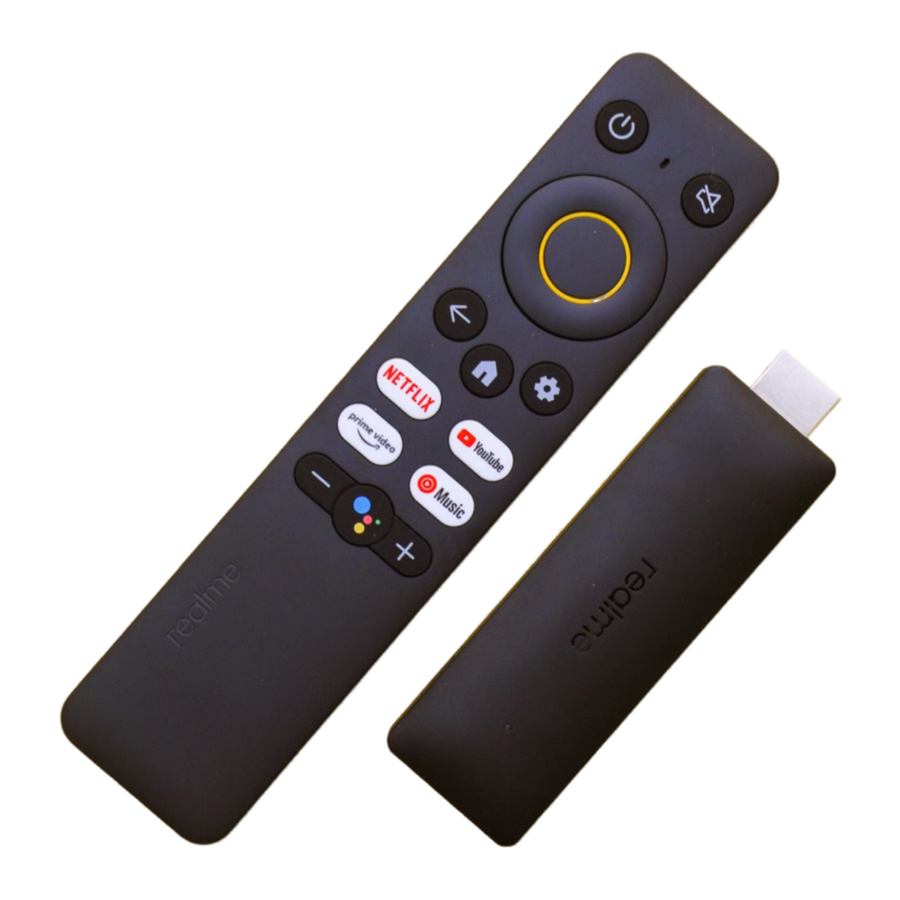
Wat zit er in de doos
Deze handleiding bevat belangrijke informatie. Lees deze zorgvuldig door voordat u het product gebruikt.

Batterijen plaatsen
Om uw ervaring te optimaliseren, duurt het 10-20 minuten om de applicatie te laden wanneer het apparaat voor de eerste keer wordt ingeschakeld. Even geduld alstublieft.

Stroomvoorziening

- Schakel de TV Stick en de TV in.
- Selecteer de juiste HDMI-ingang op de TV.
Netwerkverbinding

Koppelen

Instellingen
Selecteer de taal.

Instellen met de Google Home-app.
Of stel stap voor stap in met de afstandsbediening.

Druk op de Google Assistant-knop op uw afstandsbediening om met Google te praten.**

Zoek naar apps en games om te downloaden.

Specificaties
| CPU | Quad core ARM Cortex-A35 |
| GPU | ARM G31MP2 |
| RAM | 2GB |
| Storage | 8GB |
| HDMI | 2.1 |
| Wireless | 802.11 a/b/n/g/ac 2.4GHz/5GHz |
| Bluetooth | 5.0 |
| Input Voltage | DC 5V, 1A |
| OS | Google TV |
| Operating temperature range | 0℃ ~ +40 ℃ |
| Storage temperature | -10℃ ~ +70 ℃ |
Radiogolf specificaties
| Radio | Frequentie | Max. uitgangsvermogen |
| Bluetooth | 2.4GHz ~2.4835GHz | 8±2 dBm (EIRP) |
| 2.4GHz Wi-Fi | 2.4GHz ~2.4835GHz | 17±2 dBm (EIRP) |
| 5GHz Wi-Fi | 5.150GHz ~5.350GHz | 16±2 dBm (EIRP) |
| 5.470GHz ~5.725GHz | ||
| 5.725GHz ~5.850GHz | 11±2 dBm (EIRP) |
Download handleiding
Hier kunt u de volledige pdf-versie van de handleiding downloaden. Deze kan aanvullende veiligheidsinstructies, garantie-informatie, FCC-regels, enz. bevatten.
Download Realme 4K Smart Google TV Stick handleiding