SpeedyBee F405 Mini BLS 35A 20x20 Stack Handleiding
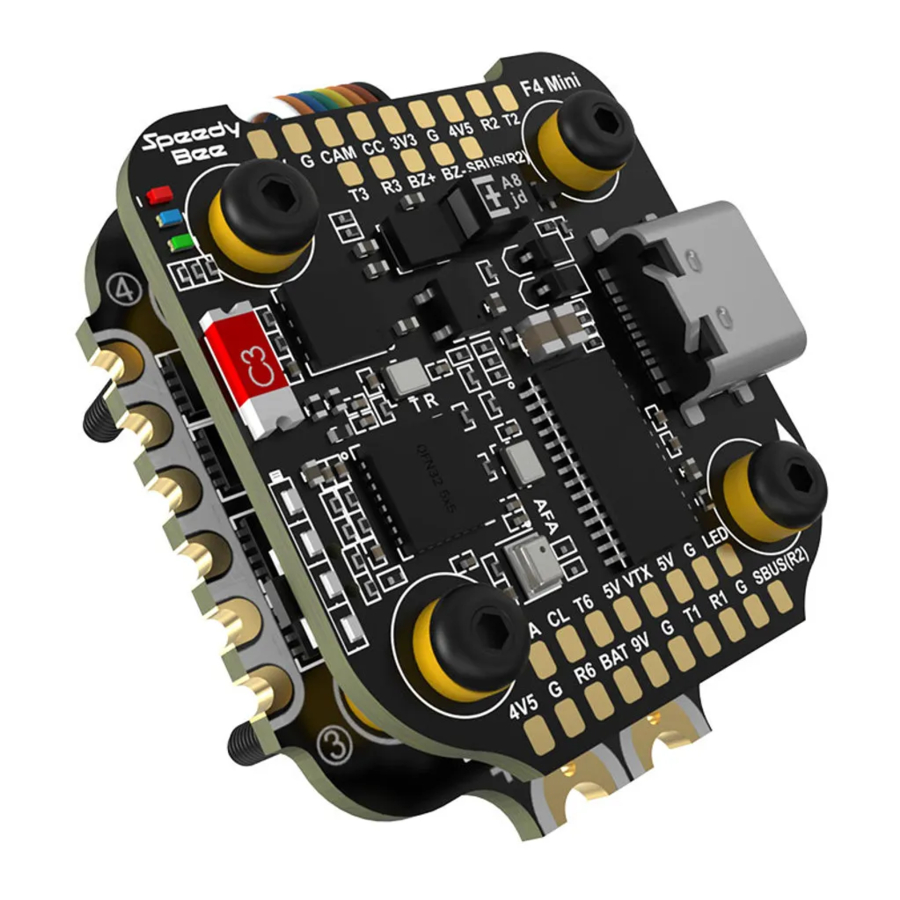
Overzicht
SpeedyBee F405 V3 30x30 Flight Controller STM32F405 ICM42688P Type-C Ingebouwde AT7456E-chip Ondersteund. Wordt gebruikt om verbinding te maken met de SpeedyBee App voor vluchtcontroller- en ESC-parameterconfiguratie. Zorg ervoor dat de MSP-schakelaar op UART 4 is ingeschakeld en is ingesteld op een baudrate van 115200, anders is de Bluetooth-functionaliteit niet beschikbaar. Niet ondersteund NIET Ondersteund. Maak verbinding met de Betaflight-configurator op de pc om de FC-firmware bij te werken. NIET Ondersteund. Maak verbinding met de Betaflight-configurator op de pc om blackbox-analyse uit te voeren. Direct solderen Compatibel met alle DJI Air Units: DJI O3/RunCam Link/Caddx Vista/DJI Air Unit V1. Gebruik de soldeerpunten <9V, G, T1, R1, G, SUBS(R2)> in de rechterhoek aan de voorkant van de vluchtcontroller om een pin-to-pin-verbinding te maken met de soldeerpunten op de DJI Air Unit. UART1(T1, R1) wordt gebruikt voor OSD en SUBS(R2) wordt gebruikt voor de interne ontvangersignaalinvoer van de DJI Air Unit. 8MB Onboard Flash Ja (CC-pad aan de voorzijde) Ondersteund. Stel voor SpeedyBee BLS 35A V2 ESC Scale=250 en Offset=-500 in. 3-6S LiPo. De vluchtcontroller wordt gevoed via de G-, V-draden van de 8-pins kabelboom of G-, V-pads vanaf de onderkant van de vluchtcontroller. 4 groepen 5V-uitgang, drie +5V-pads en 1 BZ+-pad (gebruikt voor zoemer) aan de voorzijde. De totale stroombelasting is 2A. 1 groep 9V-uitgang, één +9V-pad aan de voorzijde. De totale stroombelasting is 3A.
Specificaties Overzicht
| Productnaam | SpeedyBee F405 Mini BLS 35 A 20x20 Stack | |
| Flight Controller | SpeedyBee F405 Mini | |
| ESC | SpeedyBee BLS 35 A Mini V 2 4 in ESC | |
| B I u e to ot h | Ondersteund. Wordt gebruikt om verbinding te maken met de Speedy Bee *App voor vluchtcontroller- en ESC-parameterconfiguratie. Zorg ervoor dat de MSP sm. A/itch op UART 4 is ingeschakeld en ingesteld op een baudrate van 5200, anders is de Bluetooth-functionaliteit niet beschikbaar. | |
| NIET Ondersteund | ||
| Draadloze FC F i rr-nxnv•are ash ing | NIET Ondersteund | |
|
Dvvonloacl & Analyse | NC) T Ondersteund | |
 | 3 68 L iPo | |
 | 20 x 20r-nr-n cD3_5rnr-n gatgrootte, Corn pat i ble M/ it h screvvs/Silicone g rxnets. | 2 a n d |
 |  | |
| Gewicht | n 3.5g | |

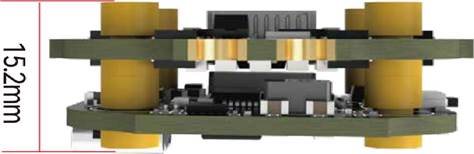
@3.5mm 03.6mm
 |
 1.6mm
1.6mm 
7.8mm 20mm 5.5mm 20mm
 Pakket
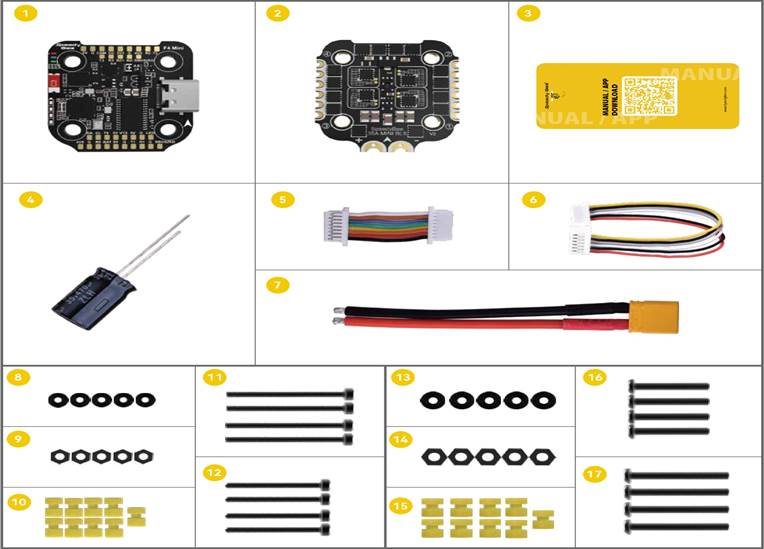
 SpeedyBee F405 Mini Flight Controller x 1
 SpeedyBee 35A BLHeliS Mini V2 4-in-l ESC x 1
  Handleiding & App Downloadkaart x 1
35V 470uF Condensator x 1
(5) 8-pins JST-kabel (voor FC- en ESC-aansluiting) x 1
6 DJI 6-pins kabel (80 mm) x 1
XT30-voedingskabel (lengte: 7 cm) x 1
M2-accessoires
(SD M2 Siliconen O-ring x 5
(9) M2 Nylon zeskantmoer x 5
M2 (gatdiameter) * 7,6 mm (hoogte) Anti—vibratie siliconen grommets x 9
 M2 (diameter) * 25 mm (lengte) Schroef x 4
 M2 (diameter) * 20 mm (lengte) Schroef x 4
M3-accessoires
 M3 Siliconen O-ring x 5
 M3 Nylon zeskantmoer x 5
05 M3 (gatdiameter) * 6,6 mm (hoogte) Anti—vibratie siliconen grommets x 9
 M3 (diameter) * 25 mm (lengte) Schroef x 4
 M3 (diameter) * 20 mm (lengte) Schroef x 4
![FC & ESC-verbinding]() FC & ESC-verbinding
FC & ESC-verbinding
 FC & ESC-verbinding
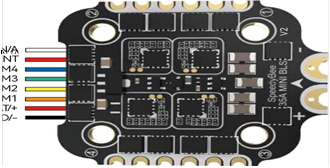
Gebruik de 8-pins kabel in de verpakking om de FC en de ESC aan te sluiten. Of soldeer 8 draden rechtstreeks aan de 8 pads aan elk uiteinde.
| Methode 1 — Met behulp van een 8-pins kabel |
Gebruik een uiteinde van de 8-pins JST-kabel om de FC op de ESC aan te sluiten.
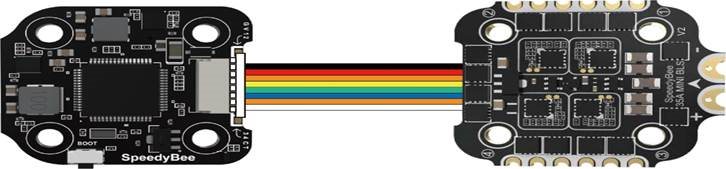
F405 Mini Flight Controller BLS 35A Mini V2 4-in-l ESC
 CURRENT
CURRENT BAT/+
TELEMETRY GND/-
| • Methode 2 — Direct solderen |
Soldeer 8 draden aan de 8 pads aan elk uiteinde, verwijzend naar de paddefinitie hieronder.
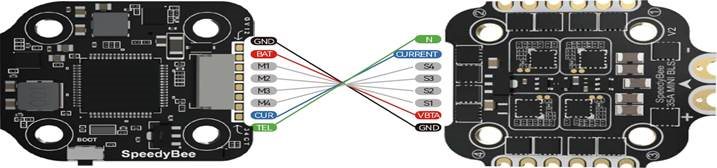
F405 Mini Flight Controller BLS 35A Mini V2 4-in-l ESC
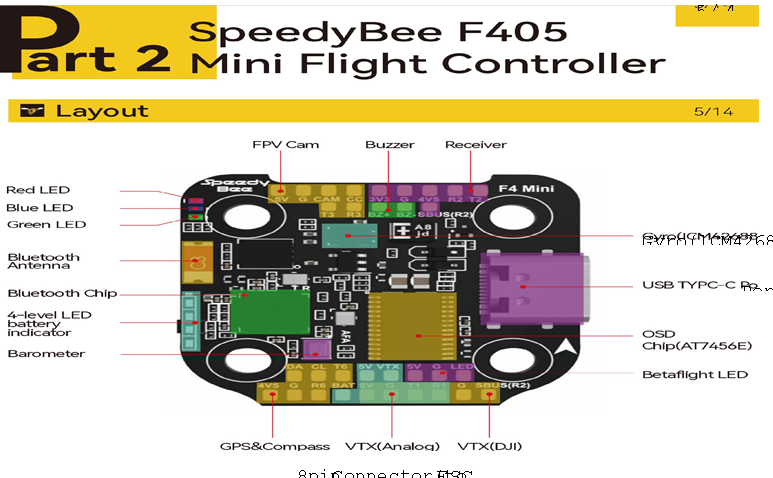
TVS-diode
 (Anti—volatge spike
5M BEC
MCU: F405
BOOT Button
9M 3A BEC
—LED-indicator Definitie
 — Povver Indicator-Solid Red after povvering up-
 — Bluetooth status light. Solid Green indicates Bluetooth is connected.
 BLUE LED — Flight controller status light »vhich is controlled by the flight
controller firrn»vare.

Only if the flight controller gets bricked and can't povver up, please f0110'vv these steps to re—flash firrnvvare for it:
O Insert a USB A to TYPE—C cable to your PC.
@ Press and hold the BOOT button, insert the USB cable into the flight controller, then release the BOOT button.
@ Open BetafIight/lNAV configurator on the PC, go to the 'Firrnvvare Flashing' page, choose the target 'SPEEDYBEEF405MlNl' and flash.





-그 Il
| •Get the Speed Bee A |

|
App & FC Configuration 
|

|
|
Found SpeedyBee F405 Mini x
|
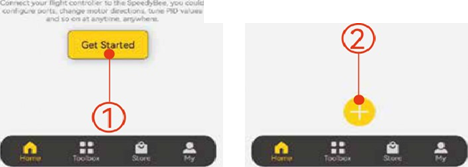 |
Zoek naar 'SpeedyBee' op Google Play of in de App Store. Of download het Android.apk-bestand op onze website: https://www.speedybee.com/download.
| •FC Configuration |
 My device(O)

 Configure your quad
  has never been easier
FC Firmware Update  8/1 4 8/1 4
|
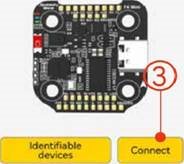
SpeedyBee F405 Mini flight controller does not support wireless firmware flashing, so please fash firmware for it on your PC following the steps below: O Connect the flight controller to the PC with a USB cable
@ Open Betafight/INAV configurator on your PC. Take Betaflight configurator as an example, go to the 'Firmware Flashing' page, choose the target 'SPEEDYBEEF405MINI' and flash.
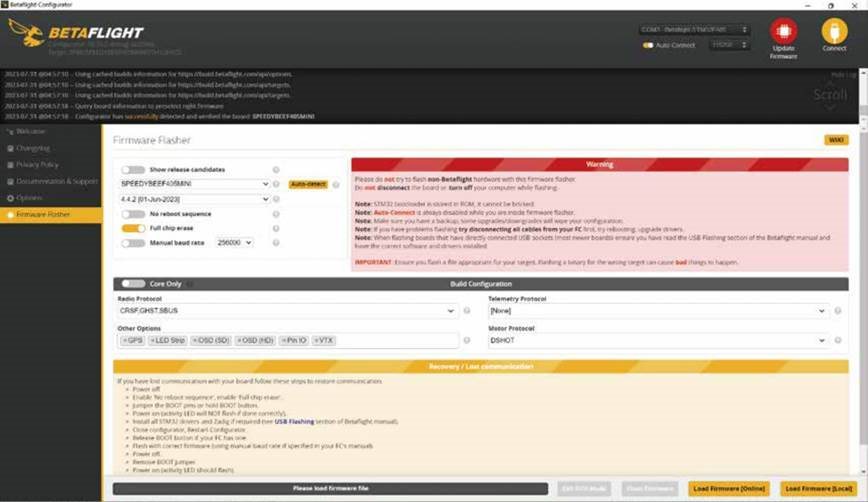
 |
| Product Name |
SpeedyBee F405 V3 30x30 Flight Controller
STM32F405 |
|
|
I ML] (Gyro) USB Pot-type Barometer |
ICM42688P Type-C Bu ilt-in |
|
|
OSD Chip BLE Bluetooth
Wireless FC Firmware Flashing Wireless Blackbox Dwonload & Analysis |
AT7456E chip
Supported. Used to connect with the SpeedyBee App for flight controller and ESC parameter configuration. Please make sure the MSP switch on I-JART 4 is turned on and set to a baud rate of 1 15200, otherwise Bluetooth functionality will not be available. Not supported NOT Supported. Please connect to the Betaflight configurator on the PC to do FC firmeare update. |
|
|
NOT Supported. Please connect to the Betaflight configurator on the PC to do blackbox analysis. |
||
| DJI Air Unit Connection Way |
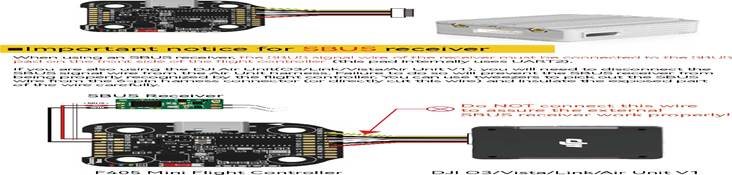
Direct soldering Compatible with all DJI Air Units: DJI 03/RunCam Link/Caddx Vista/DJl Air Unit VI Please use the solder pads <9V, G, Tl, RI, G, SLJBS(R2)> on the front right corner of the flight controller to make a pin-to-pin connection with the solder pads on the DJI Air Unit. UARTI(TI, RI) is used for OSD and SUBS(R2) is used for DJI Air Unit's internal SBUS receiver signal input. |
|
| DJI Air LJnit Compatibility | ||
| Blackbox | 8MB Onboard Flash | |
| Beta Flight Camera Control Pad | Yes(CC pad on the front side) | |
| Current Sensor Input | Supported. For SpeedyBee BLS 35A V2 ESC, please set Scale=250 and Offset=-500. | |
|
Power Input 5V Output |
3-6S LiPo. The flight controller is powered through the G, V wires of the 8pin harness or G, V pads from the bottom side of the flight controller. 4 groups of 5V output, three +5V pads and 1 BZ+ pad( used for Buzzer) on front side. The total current load is 2A. |
|
| 9V Output | 1 group of 9V output, one +9V pad on front side. The total current load is 3A. | |
|
3.3V Output 4.5V Output |
Supported. Soldering pad named '3V3' on the front top of the flight controller. Designed for 3.3V input receivers. up to 500mA current load.
Supported. Designed for radio receiver and GPS module even when the FC is powered through the USB port. Up to IA current load. |
|
| ESC Signal | Ml - M4 wires or soldering pads on bottom side. | |
| U ART | 6 sets(UART1, UART2, UART3, UART4(Dedicated for Bluetooth connection)), UART5(Dedicated for ESC telemetry), UART6 | |
| ESC Telemetry | UART R5(UART5) | |
|
12C Traditional Betaflight LED Pad |
Supported. DA & CL pads on front side. Used for magnetometer, sonar, etc Supported. 5V, G and LED pads on bottom of the front side. Used for WS2812 LEDs controlled by the Betaflight firmware. |
|
|
Buzzer BOOT Button |
BZ+ and BZ- pad used for 5V Buzzer Supported. Press and hold BOOT button and power the FC on at the same time will force the FC to enter DFLJ mode, this is for firmware flashing when the FC gets bricked. |
|
| RSS' Input | Not Supported | |
|
Supported Flight Controller Firmware Firmware Target Name Mounting |
Not Supported Beta Flight(Default), 'NAV SPEEDYBEEF405MlNl 20 x 20mm 3.5mm hole diameter, Compatible with M2 and M3 screws/Silicone grommets. |
|
|
Dimension Weight |
30(L) x 32(W) x 9.6g |




 Smart Port / F -Port
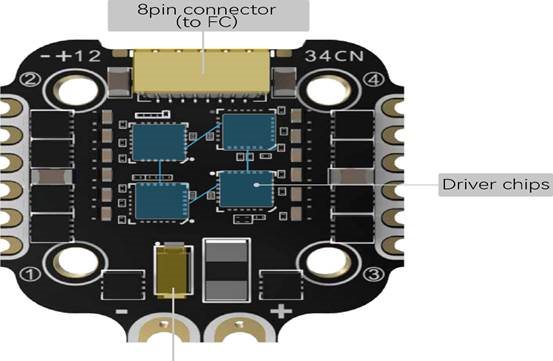
| art 3 | SpeedyBee BLS 35A Mini V2 4-in-l ESC |
| La out |
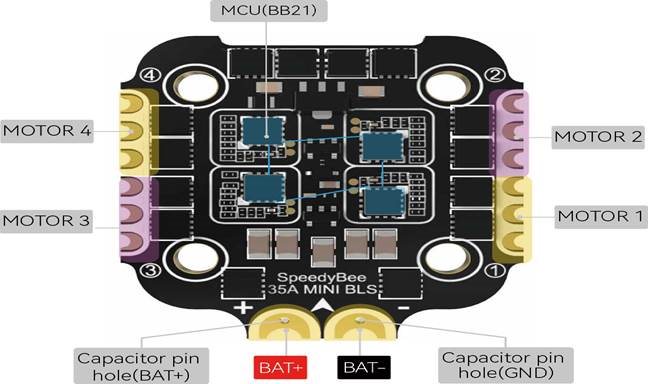 |
VS Diode)
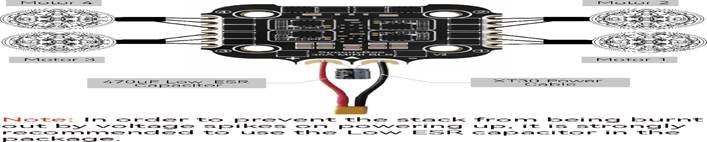
Connection with Motors & Power Cable  1 1/1 4 1 1/1 4
|
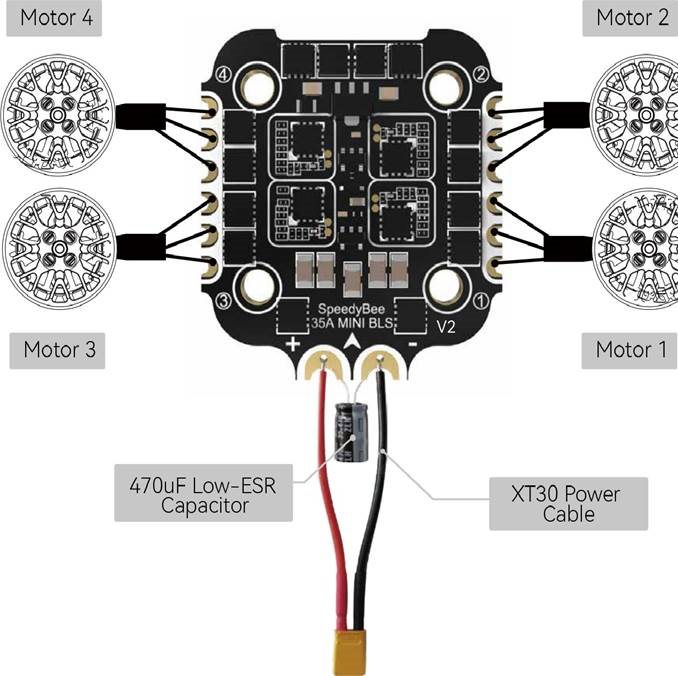 |
Opmerking: Om te voorkomen dat de stack door spanningspieken bij het inschakelen doorbrandt, wordt sterk aangeraden om de Low ESR-condensator in de verpakking te gebruiken.
ESC Configuration 
|
You could use SpeedyBee app to completely configure this 8-bit ESC for both BLHeli_S or Bluejay
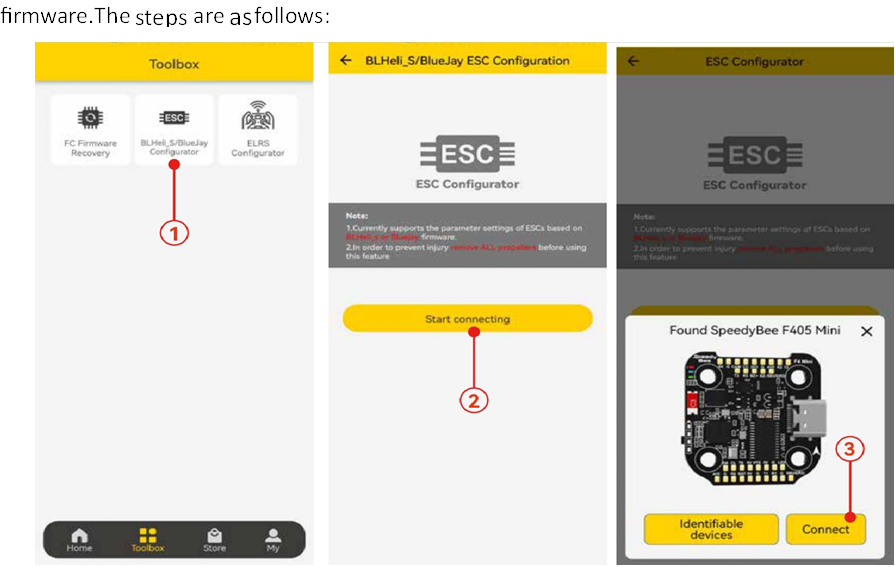
You could also use PC configurators to configure this ESC. We recommend the ESC Configurator. Please use Google Chrome browser and visist: http://www.esc-configurator.com.
This 8—bit 50A ESC: can ru•• BLHeIiS or Bluejay firrnvvare- It is loaded v•vith BLHeIiS firrrnvvare by defaultYou could also flash it to Bluejay firrnvvare vvhich can support RPtN•-1 filtering and Bi—directional Dhsot-
Firrr•vvare ash ing steps are as -6110vvs:
Rer-noxze all Che propellers fr-or-n your drone.

 |
 Ensure that the flight controller is connected properly to the ESC, then povver up the drone. This step ensu res that the ESC starts up correctly.
 Connect the flight controller to the conaputer using a USB Type—C cable-
Open the Chrorne browvser and visit the follovving vuebsite: https://vvvvvv'.esc—configurato r. corn/  Follow-v the fir revvare flashing steps as shovvrn in the screenshots belovv.
I no loortant note:
On the 6th interface, the " E SCY' type rnust be selected as 


 14/14 14/14
|
||

|
||
| Firmware | BLHeli S J-H-40 | |
| Continuous Current | 35A * | |
| Burst Current | 45A(5seconds) | |
| ESC Protocol | DSHOT300/600 | |
| Power Input | 3-6S LiP0 | |
| Power Output | VBAT(Batterijspanning, gebruikt om de flightcontroller van stroom te voorzien) | |
| Current Sensor | Support (Scale=250 Offset=-500) | |
| ESC Telemetry | Not supported | |
| Mounting | 20 x 20mm03.5mm hole size, compatible with M2 and M3 screws/Silicone grommets. | |
| Dimension | 35 * 35 * 5.5mm | |
| Weight | 7.2g | |
Referenties


Download handleiding
Hier kunt u de volledige pdf-versie van de handleiding downloaden. Deze kan aanvullende veiligheidsinstructies, garantie-informatie, FCC-regels, enz. bevatten.
Download SpeedyBee F405 Mini BLS 35A 20x20 Stack Handleiding