Akko 3068B - Multi-Modes Mechanisch Toetsenbord Handleiding
- 1 Technische Specificaties
- 2 Sneltoetsen
- 3 Systeemcommando's (Windows)
- 4 Systeemcommando's (Mac)
- 5 Achtergrondverlichting Instellingen
- 6 Bluetooth Functie Overzicht
- 7 Bluetooth Setup Instructie
- 8 Instructies voor het aanpassen van toetsen / lichteffecten
- 9 Akko Garantie- en serviceverklaring
- 10 Referenties
- 11 Download handleiding
- 12 In andere talen
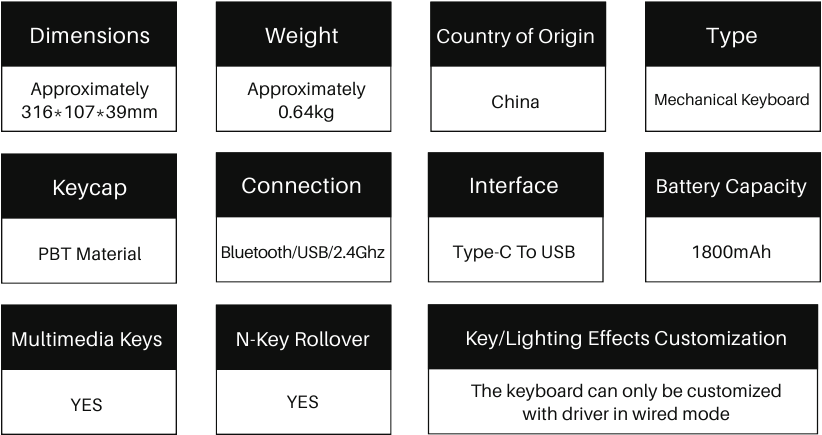
Technische Specificaties
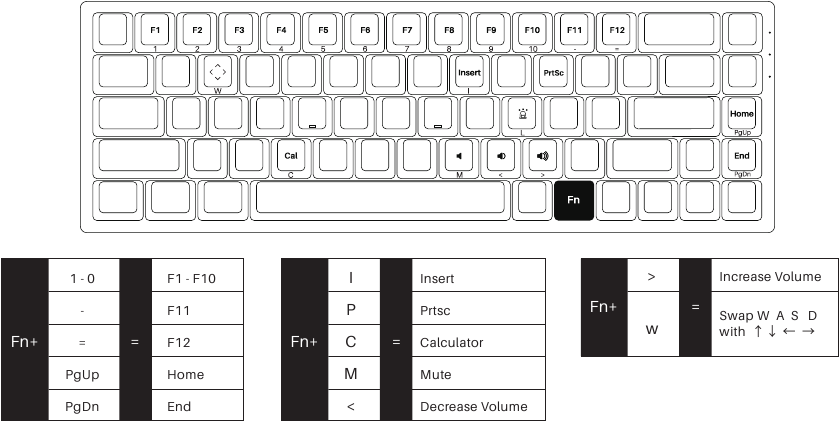
Sneltoetsen
Systeemcommando's (Windows)
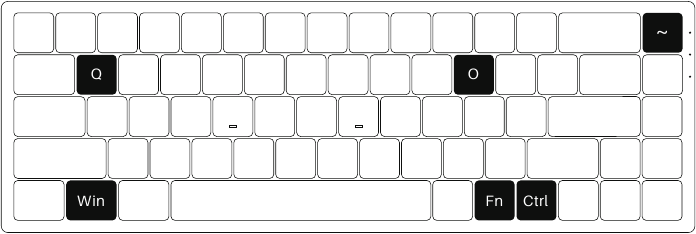
| Lock Windows Key (Windows-toets vergrendelen) | Press Fn and left Win key (Druk op Fn en de linker Windows-toets) |
| Restore Factory Settings (Fabrieksinstellingen herstellen) | Hold down Fn and press ~ key for 3S (Houd Fn ingedrukt en druk 3 seconden op de ~-toets) |
| Revert Ctrl into Menu (APP) key (Ctrl terugzetten naar Menu (APP)-toets) | Hold down Fn and press right Ctrl for 3S (Houd Fn ingedrukt en druk 3 seconden op de rechter Ctrl-toets) |
| Enter Windows system (Windows-systeem openen) | Hold down Fn and press Q key for 3S (Houd Fn ingedrukt en druk 3 seconden op de Q-toets) |
| Enter Mac system (Mac-systeem openen) | Hold down Fn and press O key for 3S (Houd Fn ingedrukt en druk 3 seconden op de O-toets) |
Systeemcommando's (Mac)
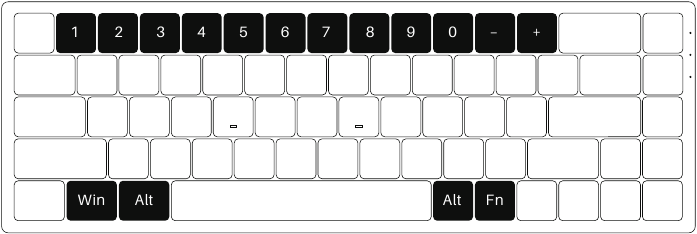
Note: The following features are realized by the combination of "Fn + corresponding key" (Opmerking: de volgende functies worden gerealiseerd door de combinatie van "Fn + overeenkomstige toets")
| 1 | Decrease display brightness (Helderheid van het scherm verminderen) | 9 | Skip forward (audio) (Vooruit springen (audio)) |
| 2 | Increases display brightness (Helderheid van het scherm verhogen) | 10 | Mute (Dempen) |
| 3 | Open mission control (Mission Control openen) | _ | Volume down (Volume lager) |
| 4 | Activate Siri (Siri activeren) | + | Volume up (Volume hoger) |
| 5 | F5 | Right Alt | Command |
| 6 | F6 | Left Win | Option |
| 7 | Skip back (Audio) (Terug springen (Audio)) | Left Alt | Command |
| 8 | Pause/Play (Audio) (Pauze/Afspelen (Audio)) |
Achtergrondverlichting Instellingen
Bluetooth Functie Overzicht
Bluetooth Setup Instructie
Overschakelen naar Bluetooth-modus
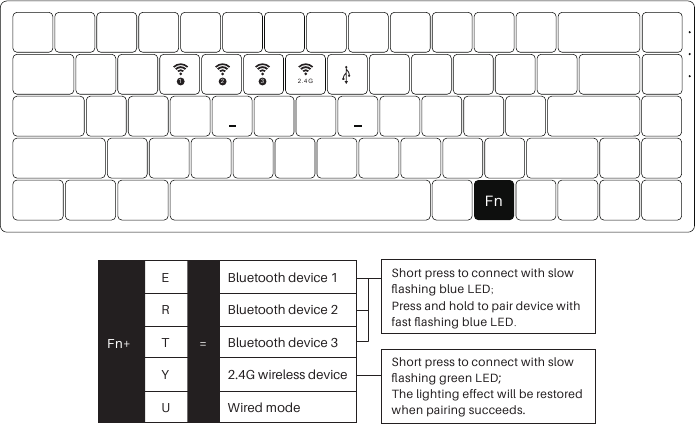
- When the keyboard remains unplugged, turn the back switch to ON. Then long press and hold Fn + E / R / T to start pairing with Bluetooth devices. The keyboard will enter Bluetooth pairing mode when the blue LEDs under E / R / T keys flash quickly. (Als het toetsenbord niet is aangesloten, zet de schakelaar aan de achterkant op AAN. Houd vervolgens Fn + E / R / T lang ingedrukt om te beginnen met koppelen met Bluetooth-apparaten. Het toetsenbord gaat naar de Bluetooth-koppelingsmodus wanneer de blauwe LED's onder de E / R / T-toetsen snel knipperen.)
- When the Keyboard is plugged into the computer through USB interface, it will enter Bluetooth mode automatically without having to push the switch on the back. Users can directly long press and hold Fn + E / R / T to enable Bluetooth pairing. The keyboard will enter Bluetooth pairing mode when the blue LEDs under E / R / T keys flash quickly. (Wanneer het toetsenbord via een USB-interface op de computer is aangesloten, gaat het automatisch naar de Bluetooth-modus zonder dat u de schakelaar aan de achterkant hoeft in te drukken. Gebruikers kunnen Fn + E / R / T direct lang ingedrukt houden om Bluetooth-koppeling in te schakelen. Het toetsenbord gaat naar de Bluetooth-koppelingsmodus wanneer de blauwe LED's onder de E / R / T-toetsen snel knipperen.)
Het Bluetooth-profiel instellen
To help user recognize individual Bluetooth device, the keyboard is equipped with both Bluetooth 5.0 and 3.0 frameworks. The device name under the Bluetooth 5.0 framework is Akko 3068BT-1 / Akko 3068BT-2 / Akko 3068BT-3 while the device name under Bluetooth 3.0 is AKK0 3068 BT3.0. Once the devices are paired through Fn + E/R/T, the system will by default memorize the last connected device before you turn off the Bluetooth mode. (Om gebruikers te helpen individuele Bluetooth-apparaten te herkennen, is het toetsenbord uitgerust met zowel Bluetooth 5.0- als 3.0-frameworks. De apparaatnaam onder het Bluetooth 5.0-framework is Akko 3068BT-1 / Akko 3068BT-2 / Akko 3068BT-3, terwijl de apparaatnaam onder Bluetooth 3.0 AKK0 3068 BT3.0 is. Zodra de apparaten zijn gekoppeld via Fn + E / R / T, onthoudt het systeem standaard het laatst verbonden apparaat voordat u de Bluetooth-modus uitschakelt.)
Bluetooth Koppelen
The keyboard can be paired with PC, Pad, smartphone and other devices with Bluetooth turned on. When you first try to search Bluetooth devices, two groups of device names shall appear with Akko 3098 BT3.0 (Bluetooth 3.0) and Akko 3098-1 (Bluetooth 5.0). Select a Bluetooth group based on your preferences (Note: some devices can only search for the Bluetooth 5.0 group). (Het toetsenbord kan worden gekoppeld met pc, Pad, smartphone en andere apparaten met Bluetooth ingeschakeld. Wanneer u voor het eerst probeert Bluetooth-apparaten te zoeken, verschijnen er twee groepen apparaatnamen met Akko 3098 BT3.0 (Bluetooth 3.0) en Akko 3098-1 (Bluetooth 5.0). Selecteer een Bluetooth-groep op basis van uw voorkeuren (Opmerking: sommige apparaten kunnen alleen zoeken naar de Bluetooth 5.0-groep).)
Het Bluetooth-apparaat schakelen
After 4 Bluetooth devices have been paired with the keyboard, press Fn+E / Fn+R / Fn+T / Fn+Y for at least 3 seconds to quickly switch between them. (Nadat 4 Bluetooth-apparaten met het toetsenbord zijn gekoppeld, houdt u Fn + E / Fn + R / Fn + T / Fn + Y minimaal 3 seconden ingedrukt om er snel tussen te schakelen.)
Het toetsenbord uitschakelen
Turn the power off on the keyboard back panel while unused for power saving; (Schakel de stroom uit op het achterpaneel van het toetsenbord wanneer het niet wordt gebruikt om energie te besparen;)
If the keyboard remains unused for over 10 mins, it would go to sleep mode and you can activate it by pressing any key. (Als het toetsenbord langer dan 10 minuten niet wordt gebruikt, gaat het naar de slaapstand en kunt u het activeren door op een willekeurige toets te drukken.)
Note: The battery saver mode for Windows system would affect/delay the sleep activation time of the keyboard. (Opmerking: de batterijbesparingsmodus voor het Windows-systeem heeft invloed op / vertraagt de activeringstijd van de slaapstand van het toetsenbord.)
Het toetsenbord resetten
If you forgot the specific paired front-end device or if there remains disorder in Bluetooth connection and communication, you'll need to clear the computer's Bluetooth cache by removing the 3068 keyboard from the list of connected device. (Als u het specifieke gekoppelde front-endapparaat bent vergeten of als er een storing is in de Bluetooth-verbinding en -communicatie, moet u de Bluetooth-cache van de computer wissen door het 3068-toetsenbord uit de lijst met verbonden apparaten te verwijderen.)
Instructies voor het aanpassen van toetsen / lichteffecten
- The key/lighting effects customization must be completed in wired mode with Akko driver. (Het aanpassen van toetsen / lichteffecten moet worden voltooid in de bekabelde modus met het Akko-stuurprogramma.)
- In wired mode, the lighting effects can also achieve music rhythm effects with Akko driver. (In de bekabelde modus kunnen de lichteffecten ook muziekritme-effecten bereiken met het Akko-stuurprogramma.)
- Please download the Akko Cloud driver on our website. (Download het Akko Cloud-stuurprogramma op onze website.)
- Users can download the driver via en.akkogear.com
Akko Garantie- en serviceverklaring
- Akko provides 1-year warranty for customers in mainland China. For other regions, please contact your seller (Akko distributor) for specific warranty policy. (Akko biedt 1 jaar garantie voor klanten op het vasteland van China. Neem voor andere regio's contact op met uw verkoper (Akko-distributeur) voor het specifieke garantiebeleid.)
- If the warranty window expires, customers need to pay for repairs. Akko will also provide instructions if users prefer to repair the keyboard by themselves. However, users shall take full responsibility for any loss happened during self-repair. (Als de garantieperiode verloopt, moeten klanten betalen voor reparaties. Akko zal ook instructies geven als gebruikers het toetsenbord liever zelf repareren. Gebruikers zijn echter volledig verantwoordelijk voor eventuele schade die is opgetreden tijdens zelfreparatie.)
- Dissembling the keyboard without manufacturer/seller's instruction will immediately void the warranty. (Het demonteren van het toetsenbord zonder instructie van de fabrikant / verkoper maakt de garantie onmiddellijk ongeldig.)
- The return and warranty policy may vary in different platforms and are subject to the specific distributor at the time of purchase. (Het retour- en garantiebeleid kan verschillen op verschillende platforms en is afhankelijk van de specifieke distributeur op het moment van aankoop.)
| Precautions (Voorzorgsmaatregelen) | Man-made damage is not limited to immersion, falling off, and pulling off the wires with excessive force, etc. (Door de mens veroorzaakte schade is niet beperkt tot onderdompeling, eraf vallen en het lostrekken van de draden met overmatige kracht, enz.) |

Scan and subscribe to the official WeChat (Scan en abonneer u op de officiële WeChat)

Scan and subscribe to the official Weibo (Scan en abonneer u op de officiële Weibo)



Referenties

Download handleiding
Hier kunt u de volledige pdf-versie van de handleiding downloaden. Deze kan aanvullende veiligheidsinstructies, garantie-informatie, FCC-regels, enz. bevatten.
Download Akko 3068B - Multi-Modes Mechanisch Toetsenbord Handleiding


