Segway P65 - Kick Scooter Handleiding
Inhoud
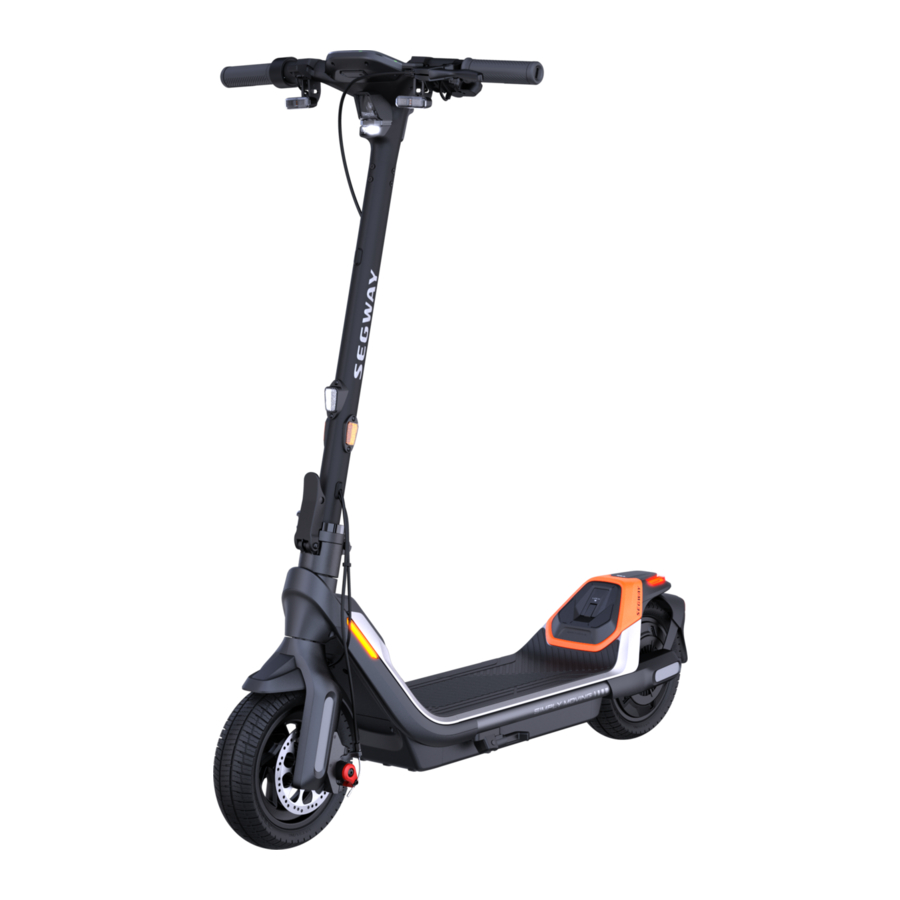
Diagram en Functies

Stuur Functies

| Naam | Functie | Bedieningsmethode |
| Power Button (Aan/uit-knop) | Power on/off (In-/uitschakelen) | Press the Power Button (Druk op de Aan/uit-knop) to power on the scooter. Press and hold to power it off. * Available only when the scooter is not in Anti-theft mode. (Houd ingedrukt om hem uit te schakelen. * Alleen beschikbaar als de scooter niet in anti-diefstalmodus staat.) |
| Wake up the dashboard (Het dashboard activeren) | Press the Power Button (Druk op de Aan/uit-knop) to wake up the dashboard when the dashboard automatically dims. (om het dashboard te activeren wanneer het dashboard automatisch dimt.) | |
| Mode Switching Button (Modus schakelknop) | Switch between speed modes (Schakelen tussen snelheidsmodi) | Press the Mode Switching Button (Druk twee keer op de Modus schakelknop) twice to switch mode. (om van modus te wisselen.) |
| Multi-function Button (Multifunctionele knop) | Turn on/off ASSIST mode (ASSIST-modus in-/uitschakelen) | Enabling ASSIST mode via the Segway-Ninebot app: When the scooter is at a complete stop, press the Multi-function Button (Multifunctionele knop) to turn on ASSIST mode. Turn off ASSIST mode: Release the throttle and squeeze the brake lever to stop, then press the Multi-function Button (Multifunctionele knop) again. (ASSIST-modus inschakelen via de Segway-Ninebot-app: Wanneer de scooter volledig stilstaat, drukt u op de Multifunctionele knop om de ASSIST-modus in te schakelen. ASSIST-modus uitschakelen: Laat het gas los en knijp in de remhendel om te stoppen en druk vervolgens opnieuw op de Multifunctionele knop.) |
| Turn on/off the headlight (De koplamp in-/uitschakelen) | Rotate the Multi-function Button (Draai de Multifunctionele knop) clockwise/counterclockwise to turn off/on the headlight. (met de klok mee/tegen de klok in om de koplamp uit/aan te zetten.) | |
| Turn on/off the adaptive headlight feature (De adaptieve koplampfunctie in-/uitschakelen) | Rotate the Multi-function Button (Draai de Multifunctionele knop) clockwise/counterclockwise and hold it for 3 seconds to turn off/on the adaptive headlight feature. * When the scooter is activated, this feature is turned on by default. (met de klok mee/tegen de klok in en houd deze 3 seconden ingedrukt om de adaptieve koplampfunctie uit/aan te zetten. * Wanneer de scooter is geactiveerd, is deze functie standaard ingeschakeld.) | |
| USB Port (USB-poort) | Charging (Opladen) | Connect your device to the USB Port (Sluit uw apparaat aan op de USB-poort) for charging. (om op te laden.) |
| Throttle (Gashendel) | Speed up (Versnellen) | Press and hold the throttle (Houd de gashendel ingedrukt) to speed up. (om te versnellen.) |
| NFC Area (NFC-gebied) | Interact with the NFC card to power on/off (Interactie met de NFC-kaart om in/uit te schakelen) | Tap the NFC card on the NFC Area (Tik met de NFC-kaart op het NFC-gebied) to power on/off the scooter. (om de scooter in/uit te schakelen.) |
| Interact with the NFC card to unlock (Interactie met de NFC-kaart om te ontgrendelen) | Tap the NFC card on the NFC Area (Tik met de NFC-kaart op het NFC-gebied) to unlock the scooter. (om de scooter te ontgrendelen.) | |
| Horn Button (Claxonknop) | Turn on the horn (De claxon activeren) | Press the Horn Button (Druk op de Claxonknop), the scooter will beep. (de scooter piept.) |
| Direction (Richting) | Turn on the left/right direction indicator (for P65E/P65I only) (Activeer de richtingaanwijzer links/rechts (alleen voor P65E/P65I)) | Press the left/right side of the Direction Indicator Button (Druk op de linker-/rechterkant van de Richtingaanwijzerknop), the left/right direction indicator will flash, and automatically turns off after 5 seconds. (de linker-/rechterrichtingaanwijzer knippert en schakelt na 5 seconden automatisch uit.) |
| Indicator Button (Indicator knop) | Enter the password (Voer het wachtwoord in) | Press the left/right side of the Direction Indicator Button (Druk op de linker-/rechterkant van de Richtingaanwijzerknop) (left is minus, right is plus) to enter the password. ((links is min, rechts is plus) om het wachtwoord in te voeren.) |
Dashboard

| Symbool | Naam | Betekenis | Beschrijving |
 | POWER Progress Bar (Vermogen voortgangsbalk) | The symbol displays the motor output power of the scooter. (Het symbool geeft het motorvermogen van de scooter weer.) | |
 | Speedometer (Snelheidsmeter) | The symbol displays the current speed of the scooter. (Het symbool geeft de huidige snelheid van de scooter weer.) | |
 | Lock (Slot) | When the icon flashes, it means the scooter enters Anti-theft mode. (Wanneer het pictogram knippert, betekent dit dat de scooter in de anti-diefstalmodus gaat.) | When powered off after 30 seconds: If the scooter is moved or touched by someone, it will enter to Anti-theft mode. P65E/P65I: The scooter will start beeping and the front and rear direction indicators will flash, and the motor will be locked automatically. P65D: The scooter will start beeping and the motor will be locked automatically. (Wanneer hij na 30 seconden wordt uitgeschakeld: Als de scooter door iemand wordt verplaatst of aangeraakt, gaat hij naar de anti-diefstalmodus. P65E/P65I: De scooter begint te piepen en de richtingaanwijzers voor en achter knipperen en de motor wordt automatisch vergrendeld. P65D: De scooter begint te piepen en de motor wordt automatisch vergrendeld.) Note: Only available to power on the scooter with NFC card. (Opmerking: Alleen beschikbaar om de scooter in te schakelen met een NFC-kaart.) |
| When the icon lights up, it means the scooter is locked. (Wanneer het pictogram oplicht, betekent dit dat de scooter is vergrendeld.) | When locked via the Segway-Ninebot app or in the unlocking state via password: P65E/P65I: The scooter will keep beeping and the tail light will flash. P65D: The scooter will keep beeping and the tail light will stay on. Unlock the scooter with the following methods: (Wanneer vergrendeld via de Segway-Ninebot-app of in de ontgrendelingsstatus via wachtwoord: P65E/P65I: De scooter blijft piepen en het achterlicht knippert. P65D: De scooter blijft piepen en het achterlicht blijft branden. Ontgrendel de scooter met de volgende methoden:)
| ||
 | Temperature Warning (Temperatuurwaarschuwing) | It indicates that the battery temperature has reached 60°C (140°F) or is below 0°C (32°F). (Het geeft aan dat de batterijtemperatuur 60°C (140°F) heeft bereikt of lager is dan 0°C (32°F).) | |
 | USB Port Icon (USB-poortpictogram) | When the USB port icon lights up, it means that the device (not fully charged) is connected to the USB port. (Wanneer het USB-poortpictogram oplicht, betekent dit dat het apparaat (niet volledig opgeladen) is aangesloten op de USB-poort.) | |
 | Bluetooth | It indicates that the scooter is connected to the Segway-Ninebot app. (Het geeft aan dat de scooter is verbonden met de Segway-Ninebot-app.) | |
 | Warning (Waarschuwing) | The symbol indicates that the scooter has detected an error. The error code will display on the dashboard. Please contact the after-sales service for repair. (Het symbool geeft aan dat de scooter een fout heeft gedetecteerd. De foutcode wordt weergegeven op het dashboard. Neem contact op met de klantenservice voor reparatie.) | |
 | Remaining battery power (Resterend batterijvermogen) | The symbol displays the remaining battery power in battery bar. (Het symbool geeft het resterende batterijvermogen weer in de batterijbalk.) | |
 | Adaptive Headlight (Adaptieve koplamp) | When the icon flashes, it means the Adaptive headlight feature is turned on. (Wanneer het pictogram knippert, betekent dit dat de adaptieve koplampfunctie is ingeschakeld.) | When this feature is turned on, the headlight will work automatically to adapt to a variety of situations and conditions and help illuminate the way. (Wanneer deze functie is ingeschakeld, werkt de koplamp automatisch om zich aan te passen aan verschillende situaties en omstandigheden en helpt hij de weg te verlichten.) |
Introductie van Snelheidsmodi
| Mode/model | P65E (Snelheidslimiet) | P65D (Snelheidslimiet) | P65I (Snelheidslimiet) | Schakelmethoden |
 (Walk) (Wandelmodus) | 3–5 km/h (1.9–3.7 mph) | 3–5 km/h (1.9–3.7 mph) | 3–5 km/h (1.9–3.7 mph) | Activeer/Deactiveer de Wandelmodus via de Segway-Ninebot app. P65E/P65I: De koplamp is altijd aan en het achterlicht blijft knipperen in de Wandelmodus. P65D: De koplamp en het achterlicht zijn altijd aan. |
 (ASSIST) | 3–5 km/h (1.9–3.7 mph) | 3–5 km/h (1.9–3.7 mph) | 3–5 km/h (1.9–3.7 mph) | ASSIST-modus inschakelen via de Segway-Ninebot app: Wanneer de scooter volledig tot stilstand is gekomen, drukt u op de Multifunctionele Knop om de ASSIST-modus in te schakelen. Opmerking: Wanneer ingeschakeld, piept de scooter eenmaal en knipperen de richtingaanwijzers voor en achter eenmaal. ASSIST-modus uitschakelen: Laat het gaspedaal los en knijp de remhendel in om te stoppen en druk vervolgens nogmaals op de Multifunctionele Knop. |
 | 11.2 mph (18 km/h) | 11.2 mph (18 km/h) | 11.2 mph (18 km/h) | Druk twee keer op de Mode Switching Button (Modusschakelknop). |
 | 12.4 mph (20 km/h) | 12.4 mph (20 km/h) | 12.4 mph (20 km/h) | Druk twee keer op de Mode Switching Button (Modusschakelknop). |
 | 15.5 mph (25 km/h) | 12.4 mph (20 km/h) | 12.4 mph (20 km/h) | Druk twee keer op de Mode Switching Button (Modusschakelknop). |
Specificaties
| Item | Parameter | |||
| Product | Name | Segway KickScooter | ||
| Model | P65E | P65I | P65D | |
| Length × Width × Height | Approx. 1190 × 634 × 1214 mm (46.9 × 25 × 47.8 in) | |||
| Folded: Length × Width × Height | Approx. 1190 × 634 × 567 mm (46.9 × 25 × 22.3 in) | |||
| Net Weight | Approx. 28 kg (61.7 lbs) | Approx. 27.5 kg (60.6 lbs) | ||
| Rider | Max. Payload | 120 kg (265 lbs) | ||
| Recommended Age | 18–60 years old | |||
| Required Height | 160–200 cm (5'2''–6'6'') | |||
| Machine | Wheelbase | 903 mm (35.6 in) | ||
| Ground Clearance | 79 mm (3.1 in) | |||
| Max. Speed | Approx. 25 km/h (15.5 mph) | Approx. 20 km/h (12.4 mph) | ||
| Typical Range [1] | Approx. 65 km (40.4 miles) | |||
| Max. Slope | Approx. 22% | |||
| Traversable Terrain | Fietspaden, parken, campussen en de meeste vlakke wegomstandigheden en typische Belgische wegen | |||
| Operating Temperature | -10 to 40°C (14 to 104°F) | |||
| Storage Temperature | -10 to 50°C (14 to 122°F) | |||
| IP Rating | IPX5 | |||
| Duration of Charging (single) | Approx. 4 h | |||
| Battery | Model | NCAF4813A/NCAF4812D | ||
| Nominal Voltage | 46.8 V  | |||
| Max. Charging | 54.6 V | |||
| Voltage Nominal Energy | 561 Wh | |||
| Nominal Capacity | 12 Ah | |||
| Charging Ambient Temperature | 0 to 45°C (32 to 113°F) | |||
| Battery Management System | Over-heating, short circuit, over-current, over-discharge and over-charge protection | |||
| Motor | Motor Type | Brushless DC (BLDC) motor | ||
| Nominal Power | 0.5 kW, 500 W | |||
| Charger | Input Voltage | 100–240 V~, 50–60 Hz, 2.0 A MAX. | ||
| Max. Output Voltage | 54.6 V | |||
| Rated Output | 53.5 V 3A | |||
| Output Power | 0.16 kW, 160 W | |||
| Item | Parameter | |
| Charger (Oplader) | Type | Built-in (Ingebouwd) |
| Model | NBW54D603D0D | |
| Tire (Band) | Type | 10.5-inch Self-sealing tubeless tires (10,5-inch Zelfdichtende tubeless banden) |
| Tire Pressure (Bandenspanning) | 30–45 psi | |
| Material (Materiaal) | Rubber | |
| Others (Overige) | Speed Modes (Snelheidsmodi) | Walk mode (Wandelmodus), ASSIST mode, ECO mode, DRIVE mode en SPORT mode |
| Brake System (Remsysteem) | Disc brake & Electric brake (Schijfrem & Elektrische rem) |
[1]: Typical Range: tested while riding with a full battery, 165 lbs (75 kg) load, 77°F (25°C), at the speed of 9.9 mph (16 km/h) on average on pavement. (Typisch bereik: getest tijdens het rijden met een volle batterij, 75 kg belasting, 25°C, met een snelheid van gemiddeld 16 km/u op een verharde weg.)
* Some of the factors that affect range include speed, number of starts and stops, ambient temperature, etc. (Enkele factoren die het bereik beïnvloeden zijn snelheid, aantal starts en stops, omgevingstemperatuur, enz.)
Veelvoorkomende fouten
| Error code (Foutcode) | Possible causes (Mogelijke oorzaken) |
| 10 | BLE Bluetooth-communicatiefout |
| 11 | Motor 1A fase stroombemonsteringsfout |
| 12 | Motor 1B fase stroombemonsteringsfout |
| 13 | Motor 1C fase stroombemonsteringsfout |
| 14 | Throttle Hall-sensor afwijking |
| 15 | Brake Hall-sensor afwijking |
| 18 | Hall-sensor afwijking |
| 21 | BMS-communicatiefout |
| 22 | BMS-wachtwoordfout |
| 23 | BMS standaard serienummer |
| 24 | Systeemspanningsdetectie afwijking |
| 26 | Flash-opslagfout |
| 27 | Besturingsbord wachtwoordfout |
| 28 | Motor MOS-driver bovenste brug kortsluiting |
| 29 | Motor MOS-driver onderste brug fout |
| 31 | Programma overslaan fout |
| 35 | Voertuig standaard serienummer |
| 39 | Batterijtemperatuursensor fout |
| 41 | Richtingaanwijzers afwijking |
| 42 | Koplamp afwijking |
| 45 | Abnormaal busstroom op-amp circuit |
Download handleiding
Hier kunt u de volledige pdf-versie van de handleiding downloaden. Deze kan aanvullende veiligheidsinstructies, garantie-informatie, FCC-regels, enz. bevatten.
Download Segway P65 - Kick Scooter Handleiding


