Lian-Li LANCOOL II MESH Handleiding
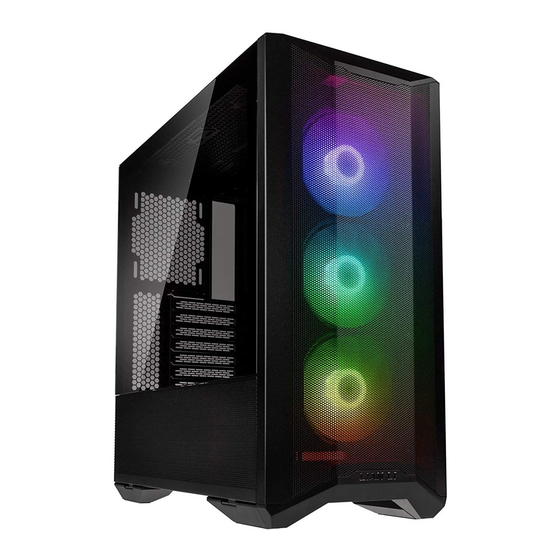
Case componenten


| A | RGB: | IO ports: 1 x AUDIO / Microphone Combo Jack, 2 x USB 3.0, 1 x USB 3.1 Type C (Optional) Power Button (Aanknop), Reset Button (Resetknop), C button for color control, M button for lighting mode control |
| PERFORMANCE: | IO ports: 1 x AUDIO / Microphone Combo Jack, 2 x USB 3.0, 1 x USB 3.1 Type C (Optional) Power Button (Aanknop), Reset Button (Resetknop), 1 x Fan speed control button | |
| B | 120 mm fan x 1, Supporting 120 mm fan x 2 or 140 mm fan x 2 or 120 mm radiator x 1, Removable dust filter or 240 mm radiator x 1, | |
| C | RGB: | NON |
| PERFORMANCE: | 120 mm fan x 1 | |
| D | Supporting 120 mm fan x 2 or 2.5" SSD x 2 | |
| E | Removable HDD tray: Supporting 3.5" HDD x 3 or 2.5" SSD x 3 | |
| F | Removable fan tray: Supporting 120 mm fan x 3 or 140 mm fan x 2 or 360 mm radiator x 1 or 280 mm radiator x 1 | |
| G | RGB: | 120 mm fan x 3 (Removable dust filter in front panel) |
| PERFORMANCE: | 140 mm fan x 2 (Removable dust filter in front panel) | |
| H | Removable HDD tray: Supporting 2.5" SSD x 2 | |
| I | PSU tray: Supporting ATX PSU x 1 (Removable dust filter in bottom) | |
| J | Removable HDD tray: Supporting 2.5" SSD x 2 | |
Hardware lijst
- Screws for mother board and 2.5" SSD mount

- Screws for PSU mounting

- Screws for 3.5" HDD mount

- Cable ties for cable management

- Screws / Anti-vibration rings for 2.5" SSD mount

- Tool for Stand off bolt

- Screws for 120 mm fan

- Velcro for cable management


Exceeded quantity are spare parts. (Overtollige hoeveelheden zijn reserveonderdelen.)
Installatie
- De ventilator is in het midden van de bovenklep geïnstalleerd

- Verwijder het voorpaneel


Handvat, trek om los te maken
- Verwijder het zijpaneel

Verwijder eerst het voorpaneel en open vervolgens de zijpanelen.
Beweeg omhoog om het zijpaneel los te maken
![waarschuwing]() Zonder het voorpaneel te verwijderen.
Zonder het voorpaneel te verwijderen.
![waarschuwing]() Let op: verwijder de beschermfolie
Let op: verwijder de beschermfolie - Moederbord installatie

- PSU installatie


- 2.5"SSD / 3.5"HDD installatie


![]()
De HDD-lade moet naar binnen worden geduwd voordat het handvat wordt gesloten.


![waarschuwing]() Opmerking: De positie van het HDD-rek kan worden aangepast
Opmerking: De positie van het HDD-rek kan worden aangepast - 2.5"SSD installatie


- 120 mm ventilator / 2.5"SSD installatie


- Kabelbeheer


- I/O poorten functie

- LED controle installatie

- I/O poorten functie

- Verwijder de ventilatorlade


![waarschuwing]() Let op: De ventilatorlade kan worden omgedraaid en heeft vier stijlen
Let op: De ventilatorlade kan worden omgedraaid en heeft vier stijlen


- Radiator & koel ondersteuning


Verwijder de kap om de 360 mm radiator te installeren

- Verwijder de magnetische stoffilters


- Verwijder deksel


- Hardware speling
- CPU luchtkoeler
- GPU
- PSU
- Radiator speling


- Optionele kits
LANCOOL II - 1X | Verticale GPU kitModel: Productnaam: LANCOOL II - 1X Verticale GPU kit LANCOOL II - 2X Zijdelings verspreide LED strips LANCOOL II - 3X Hot swappable achterplaat LANCOOL II - 4X 3.1 type C kabel GB-001X Grafische kaart anti-doorzak beugel 
LANCOOL II - 2X | Zijdelings verspreide LED strips
LANCOOL II - 3X | Hot swappable achterplaat
LANCOOL II - 4X | 3.1 type C kabel
GB-001X | Grafische kaart anti-doorzak beugel


 Zonder het voorpaneel te verwijderen.


Download handleiding
Hier kunt u de volledige pdf-versie van de handleiding downloaden. Deze kan aanvullende veiligheidsinstructies, garantie-informatie, FCC-regels, enz. bevatten.
Download Lian-Li LANCOOL II MESH Handleiding


