Lian-Li O11 DYNAMIC XL Handleiding
Inhoud
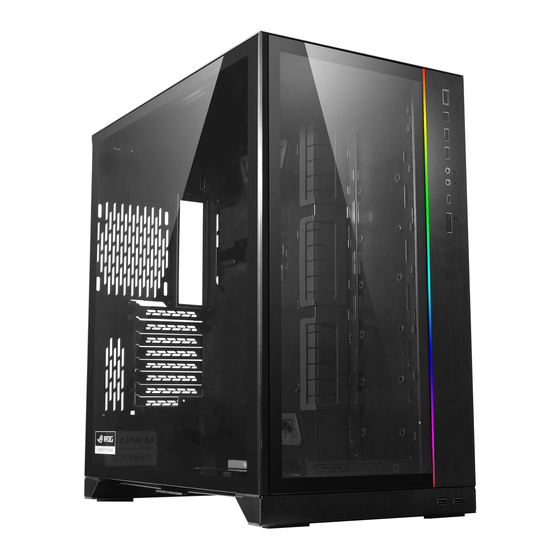
Case componenten


- Power switch / reset button (Aan/uit-schakelaar / resetknop)
- IO poorten: USB 3.0 x 2, HD audio & mic, USB 3.1 x 1 (Type-c)
USB 3.0 x 2 - ARGB control button (M: Mode (Modus), C: Color (Kleur))
- ARGB LED strip
- Ondersteuning voor 120 mm ventilator x 3 of 140 mm ventilator x 2 of 360 mm radiator x 1
- Verwijderbare ventilator/SSD lade: Ondersteuning voor 120 mm ventilator x 3 of 140 mm ventilator x 2 of 360 mm radiator x 1 of 2.5" SSD x 3
- Extra SSD lades x 3: Ondersteuning voor 120 mm ventilator x 3 of 360 mm radiator x 1 of 2.5" SSD x 3
- Verwijderbare SSD lade: Ondersteuning voor 2.5" SSD x 3
- Ondersteuning voor 120mm ventilator x 1
- Hot swappable drive trays: Ondersteuning voor 3.5" HDD x 4 of 2.5" SSD x 4 of ATX PSU x 2
- PSU tray: Ondersteuning voor ATX PSU x 1
Hardware lijst
- Schroeven voor moederbord & 2.5" SSD montage

- Stand-off bolt (Reserveonderdelen) voor moederbord montage
 voor moederbord montage")
- Schroeven voor PSU montage

- Schroeven voor 2.5" SSD montage

- Schroeven voor 3.5" HDD montage

- Klittenband voor kabelmanagement

- Rubberen pad voor PSU montage

- Schroeven voor ventilator montage


Voor Graphics Card Anti-Sag Bracket (GB-001) installatie
1 STUK  |
 2 stuks |
 2 stuks |
 2 stuks |
 2 stuks |
 Tool (Gereedschap) 2 stuks |
 4 stuks |
Overtollige hoeveelheid zijn reserveonderdelen.
Installatie
- Verwijder bovenpaneel

- Verwijder zijglas & voorruit

![waarschuwing]() Let op: Verwijder de beschermfolie aan beide zijden
Let op: Verwijder de beschermfolie aan beide zijden
- PSU installatie


- Kabel installatie gids

- Moederbord installatie

![waarschuwing]() Om een speciale spec MB te installeren (bijv. MB inclusief een LED-module en/of een dikker schild), trim de rubberen pads.
Om een speciale spec MB te installeren (bijv. MB inclusief een LED-module en/of een dikker schild), trim de rubberen pads.

- 2.5" SSD / 3.5" HDD installatie


- 2.5" SSD installatie

Druk om de HDD lade los te maken


- Kabelmanagement


- Verwijder de magnetische stoffilters


- I/O poorten functie


- LED control board installatie

- Graphics Card Anti-Sag Bracket (GB-001) installatie
 installatie Stap 1")
 installatie Stap 2")
 installatie Stap 3")
 installatie Stap 4")
- Radiator & koeling ondersteuning

- Optionele kits
Model: O11DXL-1
Upright Display Card Kits
200 mm PCI-e Express 16X Riser Card Adapter Extender Cable Kit.
Model: O11DXL-2
Extension panel
Voor EEB sized MB installatie.
- Hardware speling
- CPU luchtkoeler
- GPU
- PSU
- Radiator speling


 Let op: Verwijder de beschermfolie aan beide zijden


Referenties

Download handleiding
Hier kunt u de volledige pdf-versie van de handleiding downloaden. Deze kan aanvullende veiligheidsinstructies, garantie-informatie, FCC-regels, enz. bevatten.
Download Lian-Li O11 DYNAMIC XL Handleiding


